Posts

Showing posts with the label Python

Python IMAP list response, listing mailboxes, mailbox status, selecting_mailbox, searching messages, search criteria, fetching messages, whole messages, uploading messages, moving and copying messages, deleting messages, delete mailbox,search with uid

#  https://github.com/sanuptpm/imap import imaplib import re import email import time import email.message from imap_conf import open_connection list_response_pattern = re.compile(r'\((?P<flags>.*?)\) "(?P<delimiter>.*)" (?P<name>.*)') # print "list_response_pattern :", list_response_pattern def parse_list_response(line):     flags, delimiter, mailbox_name = list_response_pattern.match(line).groups()     mailbox_name = mailbox_name.strip('"')     return (flags, delimiter, mailbox_name) # Listing mailboxes def listing_mailboxes():     resp, data = c.list()     # IMAP instance     print "\nIMAP4_SSL instance :", c     # First parameter of the c.list()     print '\nResponse code:', resp     # Second parameter of the c.list()     print "\nmailboxes available for an account :", data     # Get the status...
How to configure IMAP in python

import imaplib def open_connection ( verbose = False ): # Connect to the server connection = imaplib.IMAP4_SSL( ' servername ' ) # Login to our account connection.login( ' username ' , ' password ' ) return connection # if __name__ == '__main__': # c = open_connection(verbose=True) # try: # resp, data = c.list() # print "\nIMAP4_SSL instance :", c # print '\nResponse code:', resp # print "\nmailboxes available for an account :", data # finally: # c.logout()

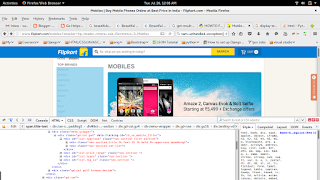
How to get href value of each a tag from the html using python Beautiful Soup

Image
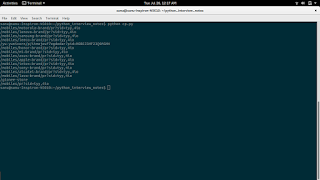
import requests from bs4 import BeautifulSoup link = "http://www.flipkart.com/mobiles?otracker=hp_header_nmenu_sub_Electronics_0_Mobiles" doc = requests.get(link) soup = BeautifulSoup(doc.text, 'html.parser') main_div = soup.find(id="list-tagcloud") div2=main_div.find_all('div')[1] links = div2.find_all('a') for link in links:     print link.attrs.get('href') OUTPUT ====== /mobiles/motorola~brand/pr?sid=tyy,4io /mobiles/lenovo~brand/pr?sid=tyy,4io /mobiles/samsung~brand/pr?sid=tyy,4io /mobiles/leeco~brand/pr?sid=tyy,4io /yu-yunicorn/p/itmejeuf7egdedar?pid=MOBEJ3MF23Q9MGMH /mobiles/honor~brand/pr?sid=tyy,4io /mobiles/mi~brand/pr?sid=tyy,4io /mobiles/asus~brand/pr?sid=tyy,4io /mobiles/apple~brand/pr?sid=tyy,4io /mobiles/intex~brand/pr?sid=tyy,4io /mobiles/sony~brand/pr?sid=tyy,4io /mobiles/alcatel~brand/pr?sid=tyy,4io /mobiles/lava~brand/pr?sid=tyy,4io /gionee-store /mobiles/pr?sid=tyy,4io

How to dispaly data from html tags using python Beautiful Soup

Image
import requests from bs4 import BeautifulSoup link = "http://www.flipkart.com/mobiles?otracker=hp_header_nmenu_sub_Electronics_0_Mobiles" doc = requests.get(link) soup = BeautifulSoup(doc.text, 'html.parser') main_div = soup.find(id="list-tagcloud") div2=main_div.find_all('div')[1] for x in div2.strings:     print x OUTPUT ====== Motorola Lenovo Samsung LeEco Yunicorn Honor Mi Asus Apple Intex Sony Alcatel Lava Gionee All

Find all the URLs found within a page’s using python

Find all the URLs found within a page’s from bs4 import BeautifulSoup html_doc = """ <html><head><title>The Dormouse's story</title></head> <body> <p class="title"><b>The Dormouse's story</b></p> <p class="story">Once upon a time there were three little sisters; and their names were <a href="http://example.com/elsie" class="sister" id="link1">Elsie</a>, <a href="http://example.com/lacie" class="sister" id="link2">Lacie</a> and <a href="http://example.com/tillie" class="sister" id="link3">Tillie</a>; and they lived at the bottom of a well.</p> <p class="story">...</p> """ soup = BeautifulSoup(html_doc, 'html.parser') for link in soup.find_all('a'):     print link.get('href...

How to use BeautifulSoup in python

BeautifulSoup 4 in Python.Beautiful Soup is a Python library for pulling data out of HTML and XML files. html_doc = """ <html><head><title>The Dormouse's story</title></head> <body> <p class="title"><b>The Dormouse's story</b></p> <p class="story">Once upon a time there were three little sisters; and their names were <a href="http://example.com/elsie" class="sister" id="link1">Elsie</a>, <a href="http://example.com/lacie" class="sister" id="link2">Lacie</a> and <a href="http://example.com/tillie" class="sister" id="link3">Tillie</a>; and they lived at the bottom of a well.</p> <p class="story">...</p> """ from bs4 import BeautifulSoup soup = BeautifulSoup(html_doc, 'html.parser') #prin...

Error: That port is already in use.

$ (raghuvirtualenv)sanu@sanu-Inspiron-N5010:~/raghu/emp/empl$ python manage.py runserver Performing system checks... System check identified no issues (0 silenced). May 09, 2016 - 11:12:08 Django version 1.9.5, using settings 'empl.settings' Starting development server at http://127.0.0.1:8000/ Quit the server with CONTROL-C. Error: That port is already in use. $ (raghuvirtualenv)sanu@sanu-Inspiron-N5010:~/raghu/emp/empl$   Solution    $ (raghuvirtualenv)sanu@sanu-Inspiron-N5010:~/raghu/emp/empl$ ps aux | grep -i manage root       106  0.0  0.0      0     0 ?        S<   May08   0:00 [charger_manager] root       855  0.0  0.0  38328  2344 ?        Ss   May08   0:00 /sbin/cgmanager -m name=systemd root   ...

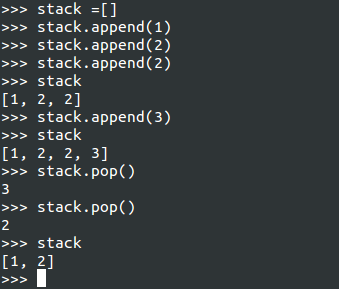
Use Python Lists as Stacks

Image
>>> stack =[] >>> stack.append(1) >>> stack.append(2) >>> stack.append(2) >>> stack [1, 2, 2] >>> stack.append(3) >>> stack [1, 2, 2, 3] >>> stack.pop() 3 >>> stack.pop() 2 >>> stack [1, 2] >>>

Python List and Method

Create empty list : >>> list = [] 1) Add an item to the end of the list >>> list.append(1) 2) Extend the list by appending all the items in the given list >>>list1[1,2,3,4,5] >>>list.extend(list1) 3) Insert an item at a given position. The first argument is the index of the element before which to insert. >>>list.insert(0,3) 4) Remove the first item from the list whose value is 4. It is an error if there is no such item. >>>list.remove(4) 5) Remove the item at the given position in the list, and return it. If no index is specified, list.pop() removes and returns the last item in the list. >>>list.pop(1) 6) Return the index in the list of the first item whose value is x. >>> list.index(3) 7) Return the number of times x appears in the list. >>> list.count(3) 8) Sort the items of the list. >>>list.sort() 9) Reverse the elements of the list >...

About Dictionary

..... Adding new key-value pair to dictionary $ menu = {} # Empty dictionary $ menu['Chicken Alfredo'] = 14.50 $ print menu['Chicken Alfredo'] $ print "There are " + str(len(menu)) + " items on the menu."     There are 1 items on the menu. .....Removed from a dictionary $ del dict_name[key_name]   

About Python Lists

About Python Lists Lists are a datatype you can use to store a collection of different pieces of information as a sequence under a single variable name … ..You can assign items to a list with Example : $ list_name = [item_1, item_2] Example : A list can also be empty: $ empty_list = [] Example : $ animals = ["cat", "dog", "lion", "tiger"];   print "The first " + animals[0] print "The second " + animals[1] print "The third " + animals[2] print "The fourth " + animals[3] Example : $ numbers = [5, 6, 7, 8] $ print numbers[0] + numbers[2] $ 12 Replace list value $ animals[2] = "zzz" … ..You can add items to the end of a list $ number.append(“9”) … ..List Slicing Sometimes, you only want to access a portion of a list. numb...

Vim editor Basic commands

Vim editor Basic commands    Moving through the text is usually possible with the arrow keys. h to move the cursor to the left l to move it to the right k to move up j to move down Basic operations n dd will delete n lines starting from the current cursor position. n dw will delete n words at the right side of the cursor. x will delete the character on which the cursor is positioned :n moves to line n of the file. :w will save (write) the file :q will exit the editor. :q! forces the exit when you want to quit a file containing unsaved changes. :wq will save and exit :w newfile will save the text to newfile. :wq! overrides read-only permission (if you have the permission to override permissions, for instance when you are using the root account. /string will search the st...

How to search WORD in directory and sub-directory

This will search word in current directory and sub directory  $  grep -r " WORD " * OR $  grep -r " WORD " .

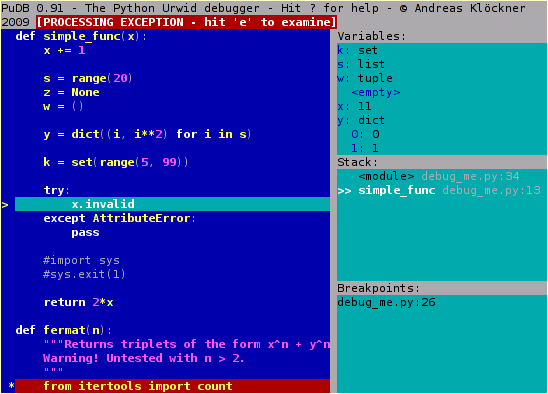
Debugging in Python

Image
$ sudo easy_install pudb To start debugging, simply insert into code from pudb import set_trace; set_trace() OR A shorter alternative to this is: import pudb; pu.db COMMANDS   Press "Enter" to goto "Edit Preferences" pop-up window. Press "Space" to select the settingsPress "Esc" to close the pop-up window Press "Ctrl" + "x" to goto Command Line. Press "Ctrl" + "x" to exit from Command Line. Press "n" to execute next line Press "s" to step into a method/function Press "c" to continue the execution select the line where you want to set the breakpoint and press "b", then you can see a red mark in that line. Then Press "c" to continue the execution and stop at breakpoint

How to find directory with terminal In Ubuntu

$ find . -type d | grep <dir name> Output ./topy ./topy/.git ./topy/.git/refs ./topy/.git/refs/tags ./topy/.git/refs/heads ./topy/.git/refs/remotes ./topy/.git/refs/remotes/origin ./topy/.git/hooks ./topy/.git/objects ./topy/.git/objects/3c ./topy/.git/objects/a1 ./topy/.git/objects/b3 ./topy/.git/objects/79

How to submit edited changes git review

Clone from git $ git clone https://github.com/openstack/cinder.git Cloning into 'cinder'... remote: Counting objects: 42771, done. remote: Compressing objects: 100% (38/38), done. remote: Total 42771 (delta 17), reused 4 (delta 0) Receiving objects: 100% (42771/42771), 20.94 MiB | 52.00 KiB/s, done. Resolving deltas: 100% (27315/27315), done. Checking connectivity... done. Go to cinder directory $  cd cinder Get the latest Patch Set $ git fetch https://review.openstack.org/openstack/cinder refs/changes/12/110312/4 && git checkout FETCH_HEAD * branch refs/changes/12/110312/4 -> FETCH_HEAD Note: checking out 'FETCH_HEAD'. You are in 'detached HEAD' state. You can look around, make experimental changes and commit them, and you can discard any commits you make in this state without impacting any branches by p...

How to set git editor always as VIM

Please Just try $ git config --global core.editor "vim"

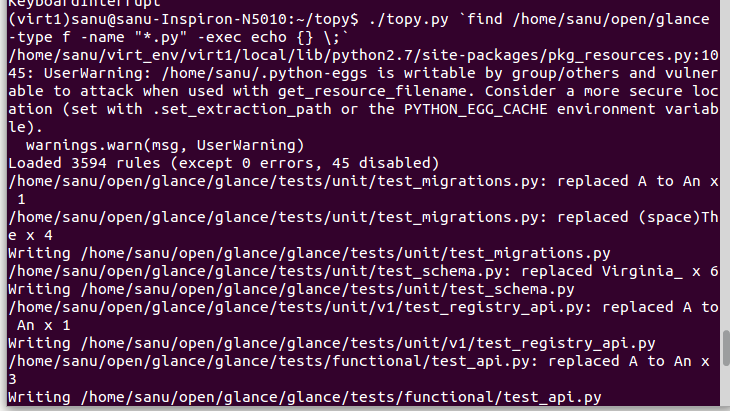
How to get output of all directery file error with single topy .py

Image
$ ./topy.py `find /home/sanu/horizon -type f -name "*.py" -exec echo {} \;` $ find /home/sanu/horizon -type f -name "*.py" -exec echo {} \; $ cat 'find /home/sanu/horizon -type f -name "*.py" -exec echo {} \;'