Posts

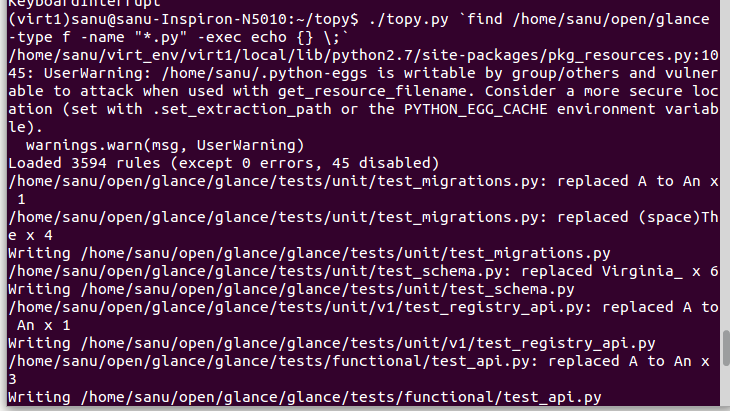
How to get output of all directery file error with single topy .py

Image
$ ./topy.py `find /home/sanu/horizon -type f -name "*.py" -exec echo {} \;` $ find /home/sanu/horizon -type f -name "*.py" -exec echo {} \; $ cat 'find /home/sanu/horizon -type f -name "*.py" -exec echo {} \;'

ImportError: No module named bs4

$ ./topy.py /home/sanu/horizon/horizon/views.py home/sanu/virt_env/virt1/local/lib/python2.7/site-packages/pkg_resources.py:1045: UserWarning: /home/sanu/.python-eggs is writable by group/others and vulnerable to attack when used with get_resource_filename. Consider a more secure location (set with .set_extraction_path or the PYTHON_EGG_CACHE environment variable). warnings.warn(msg, UserWarning) Traceback (most recent call last): File "./topy.py", line 24, in <module> from bs4 import BeautifulSoup ImportError: No module named bs4 $ easy_install beautifulsoup4 Searching for beautifulsoup4 Reading https://pypi.python.org/simple/beautifulsoup4/ Best match: beautifulsoup4 4.3.2 Downloading https://pypi.python.org/packages/source/b/beautifulsoup4/beautifulsoup4-4.3.2.tar.gz#md5=b8d157a204d56512a4cc196e53e7d8ee Processing beautifulsoup4-4.3.2.tar.gz Writing /...

ImportError: No module named regex

$ ./topy.py /home/sanu/horizon/horizon/view.py Traceback (most recent call last): File "./topy.py", line 21, in <module> import regex ImportError: No module named regex $ sudo apt-get install python-dev [sudo] password for sanu: Reading package lists... Done Building dependency tree Reading state information... Done The following extra packages will be installed: libexpat1-dev libpython-dev libpython2.7-dev python2.7-dev The following NEW packages will be installed: libexpat1-dev libpython-dev libpython2.7-dev python-dev python2.7-dev 0 upgraded, 5 newly installed, 0 to remove and 0 not upgraded. Need to get 22.4 MB of archives. After this operation, 35.1 MB of additional disk space will be used. Do you want to continue? [Y/n] y Get:1 http://in.archive.ubuntu.com/ubuntu/ trusty/main libexpat1-dev amd64 2.1.0-4ubuntu1 [115 kB] Get:2 ...
How to use virtual environment in ubuntu

$ sudo apt-get install python-setuptools Reading package lists... Done Building dependency tree Reading state information... Done The following NEW packages will be installed: python-setuptools 0 upgraded, 1 newly installed, 0 to remove and 0 not upgraded. Need to get 230 kB of archives. After this operation, 830 kB of additional disk space will be used. Get:1 http://in.archive.ubuntu.com/ubuntu/ trusty/main python-setuptools all 3.3-1ubuntu1 [230 kB] Fetched 230 kB in 9s (25.2 kB/s) Selecting previously unselected package python-setuptools. (Reading database ... 225639 files and directories currently installed.) Preparing to unpack .../python-setuptools_3.3-1ubuntu1_all.deb ... Unpacking python-setuptools (3.3-1ubuntu1) ... Setting up python-setuptools (3.3-1ubuntu1) ... $ sudo easy_install virtualenv Searching for virtualenv Rea...

git: 'review' is not a git command. See 'git --help'.

$ sanu@sanu-VirtualBox:~/ openstack-manuals$  git review -sgit: 'review' is not a git command. See 'git --help'.  Answer : $ sudo apt-get install git-review

git review -s WARNING: UNPROTECTED PRIVATE KEY FILE

Image
 git review -s WARNING: UNPROTECTED PRIVATE KEY FILE To fix this, you’ll need to reset the permissions back to default: sudo chmod 600 ~/.ssh/id_rsa sudo chmod 600 ~/.ssh/id_rsa.pub if you are getting another error: Are you sure you want to continue connecting (yes/no)? yes Failed to add the host to the list of known hosts (/home/geek/.ssh/known_hosts). This means that the permissions on that file are also set incorrectly, and can be adjusted with this: sudo chmod 644 ~/.ssh/known_hosts Finally, you may need to adjust the directory permissions as well: sudo chmod 755 ~/.ssh

WARNING: REMOTE HOST IDENTIFICATION HAS CHANGED

Image
There is a wrong line (line number 1)  in /home/user/.ssh/known_hosts file. Please remove that line from  /home/user/.ssh/known_hosts file. then try ssh again you can use "vim known_hosts " text editor to edit that file like #vim /home/user/.ssh/known_hosts     then type ":1" to goto line 1 and  type "d" to delete that line. then save and close that file by typing ":wq"